WhyBuy AI Agent (WordPress) — Scenario‑Driven AI Support Assistant for Awesome Support
A scenario-driven AI assistant for WordPress that combines structured conversation flows, FAQ routing, and a lightweight frontend smart chat widget—built to improve support efficiency while staying compatible with Awesome Support workflows.
Looking for custom WordPress plugin development that solves real business challenges? Explore my WordPress Plugin Development portfolio or WordPress development services, and get in touch to discuss your project.
Project Overview:
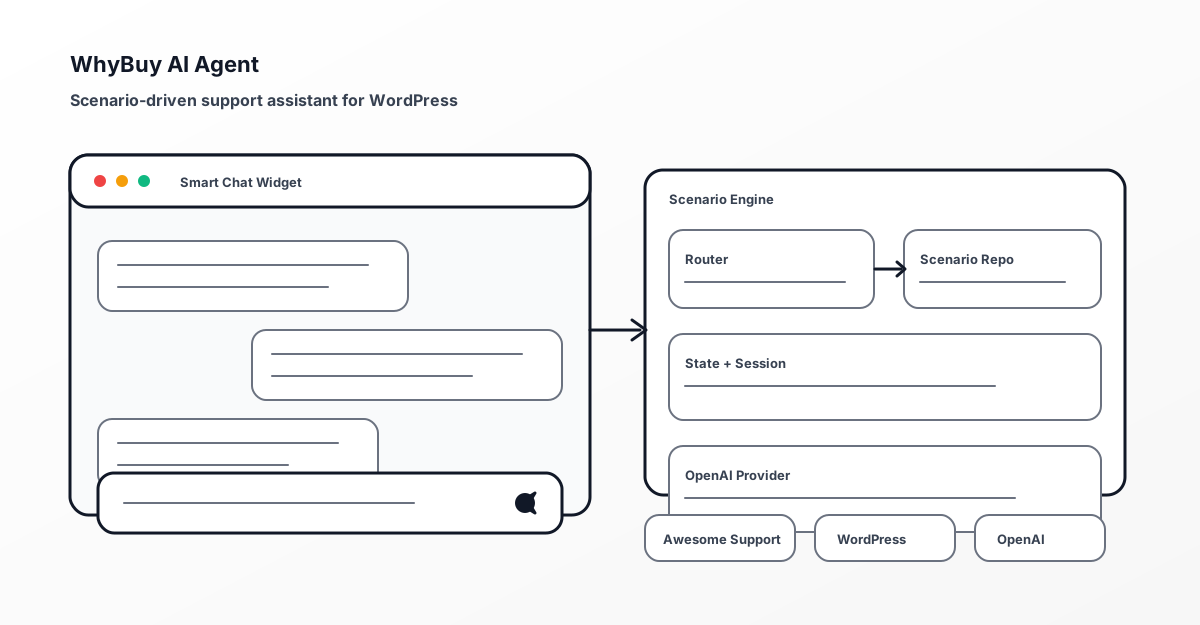
I developed WhyBuy AI Agent as a support-first AI assistant for WordPress sites that rely on Awesome Support. Instead of behaving like a generic chatbot, it uses a scenario engine to route messages into the most appropriate workflow—either a structured state-based flow or a simple Q&A mode.
The result is an assistant that’s designed to fit real support operations: it keeps context, handles topic changes, and produces consistent, controlled responses using OpenAI—while remaining aligned with WordPress plugin best practices and Awesome Support compatibility requirements.
Challenge
The Problem: Most “AI chat widgets” fail in customer support environments because they’re not aligned with real workflows. They often answer questions without collecting enough information for follow-up, lose context when users change topics, and create extra work for support teams.
The project needed to solve several interconnected issues:
- Workflow Alignment — The assistant needed to guide users through support-friendly flows, not just reply with generic answers
- Topic Switching — Users change intent frequently; the assistant must re-evaluate intent without getting stuck
- Reliable Session Handling — Conversations must continue predictably across requests
- Secure Messaging — Frontend chat must be protected using WordPress nonce patterns
- Maintainable Architecture — Clear separation between scenario logic, AI provider calls, and UI behavior
- Plugin Compatibility — Must integrate cleanly with Awesome Support (and fail gracefully if requirements aren’t met)
Solution Architecture
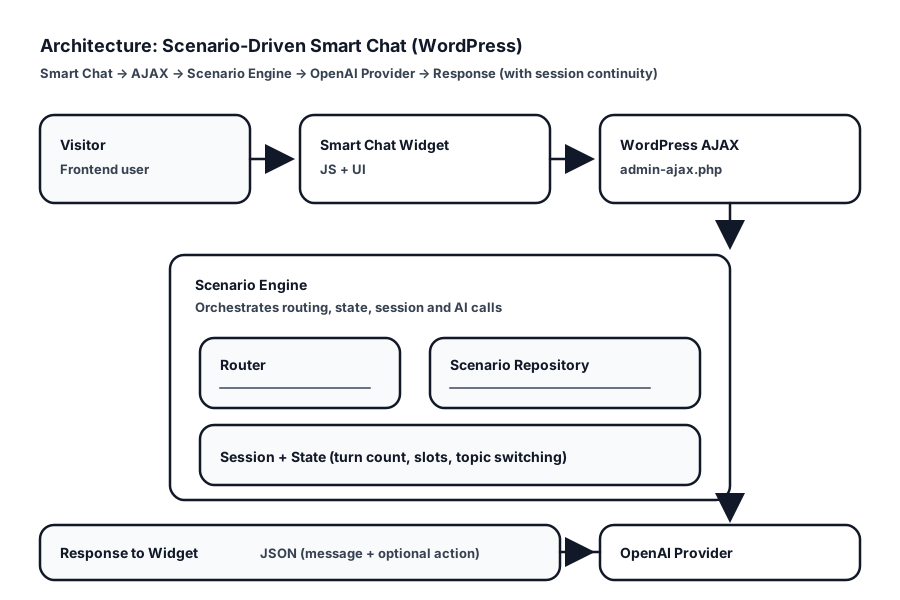
The Solution: I architected a scenario-driven AI assistant that treats conversations as a stateful process,
combining intent routing, session persistence, and OpenAI responses—wrapped in a lightweight frontend chat interface that uses WordPress-secure AJAX patterns.
I designed a multi-layered solution addressing each challenge:
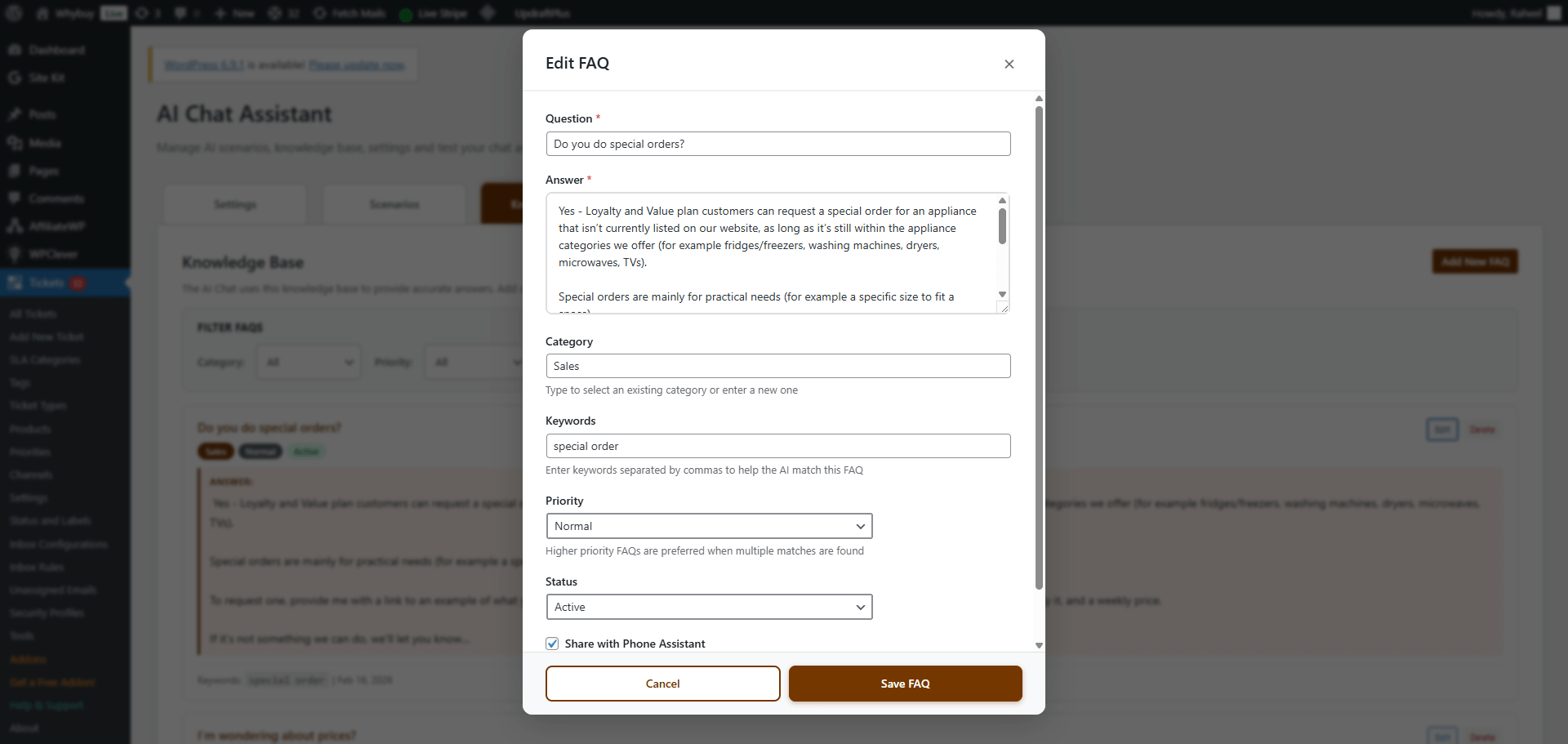
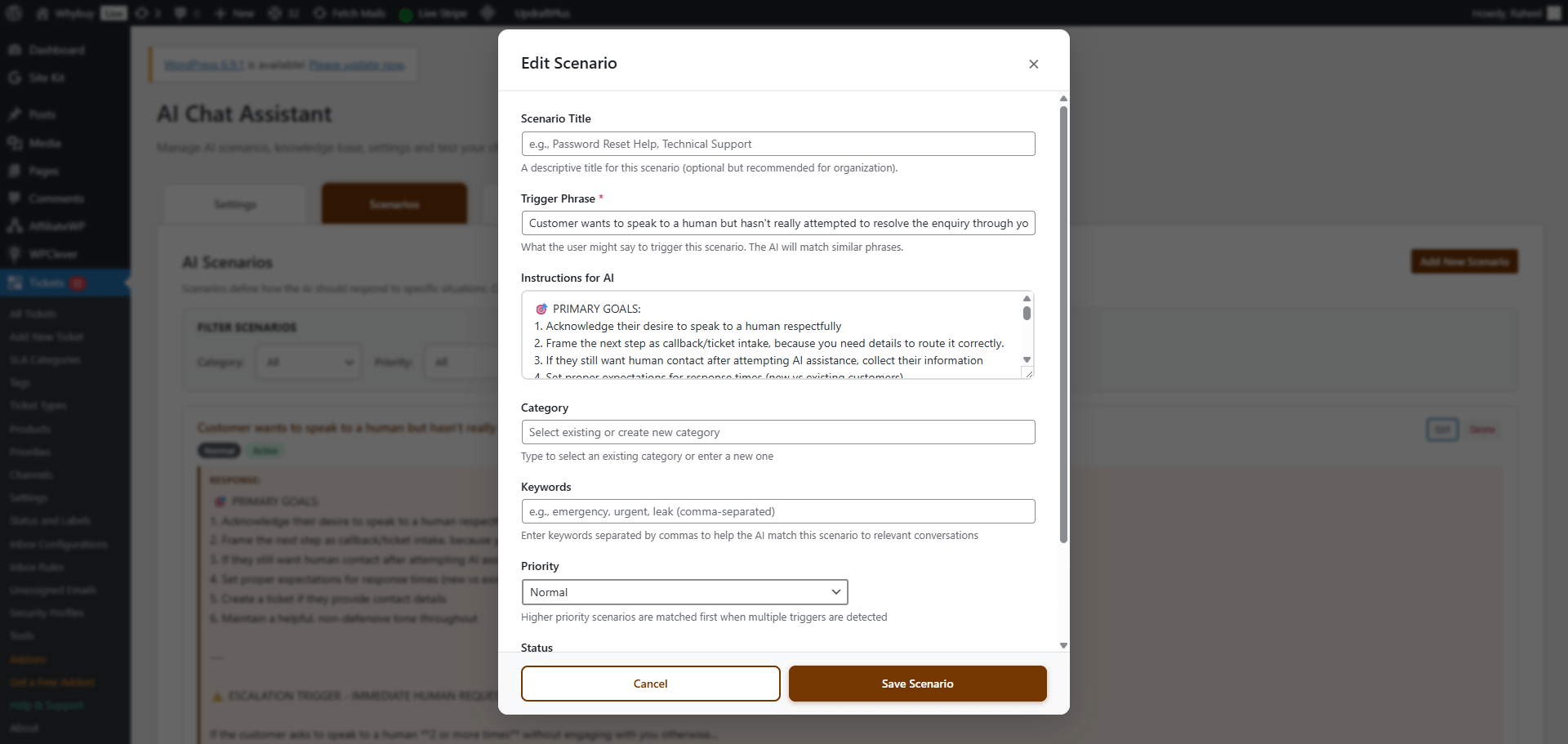
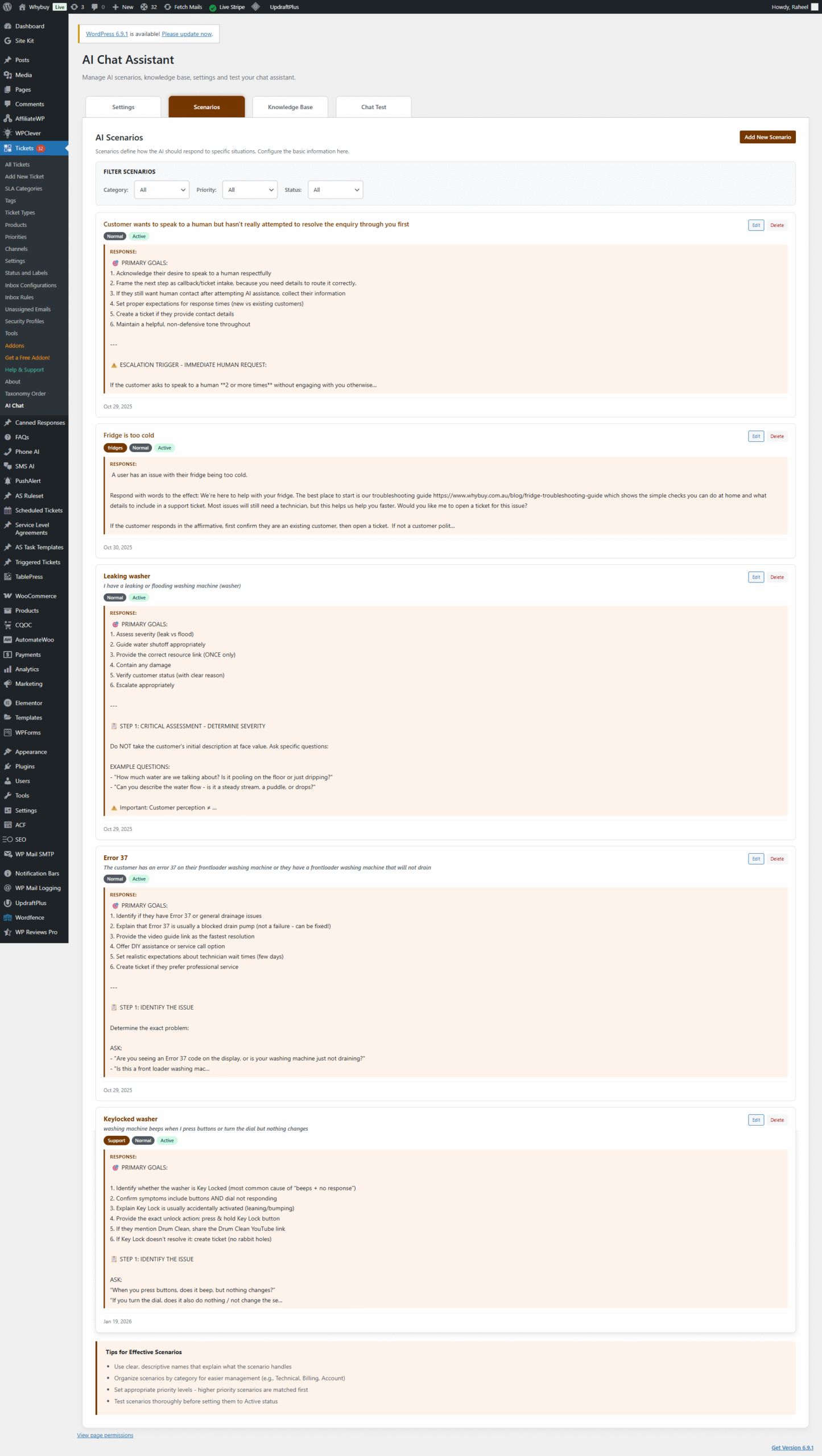
- Scenario Routing & Prioritization
Routes each incoming message to the best matching scenario, ensuring the assistant follows the right workflow for the user’s intent. - State & Session Management
Persists scenario ID, state, slots, and turn count so the assistant can continue reliably and avoid repetitive questions. - Smart Chat Frontend
A frontend widget that injects into the site and communicates via secure AJAX requests (nonce verification + sanitization). - OpenAI Provider Layer
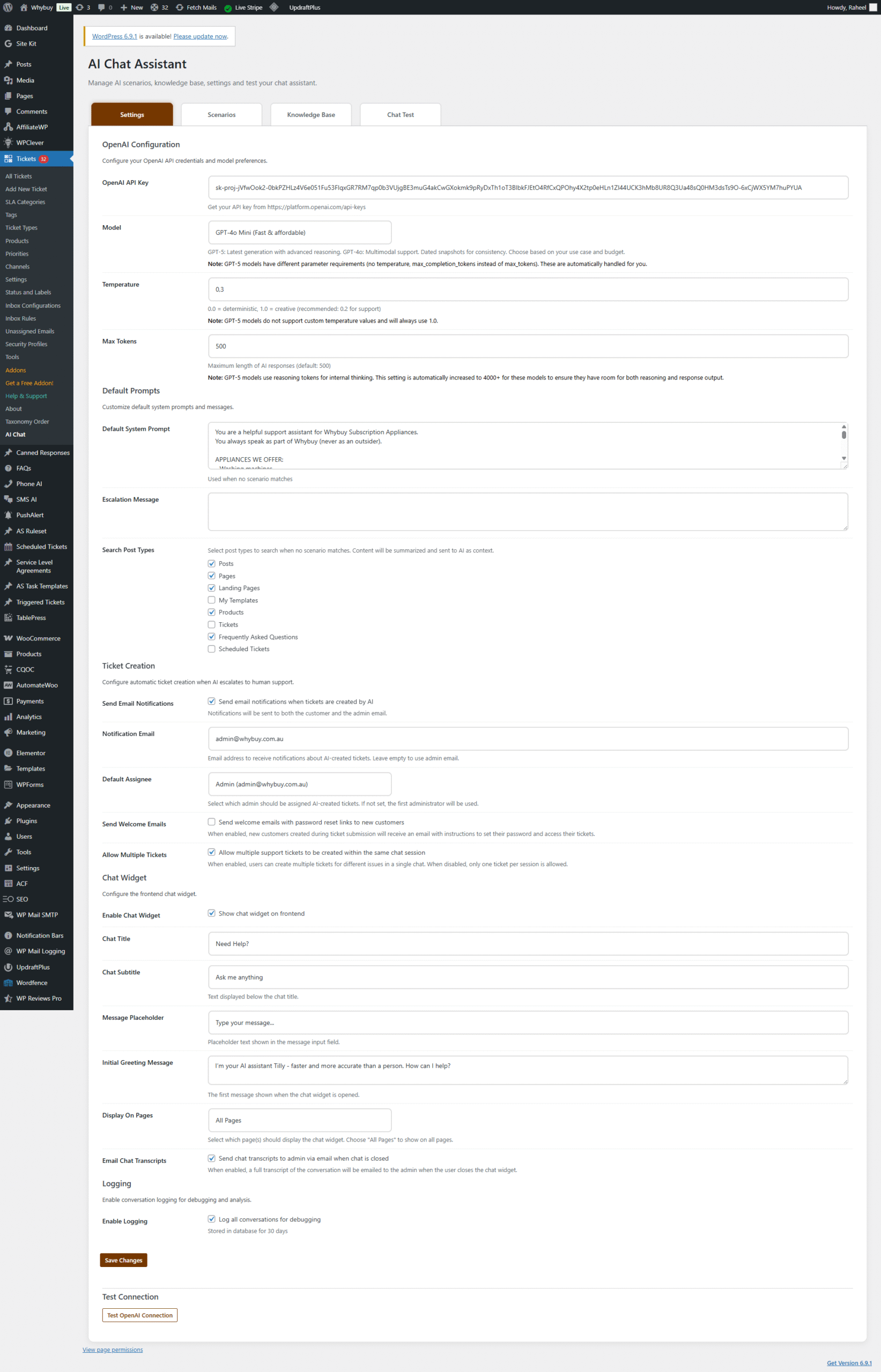
Encapsulates OpenAI request/response handling, model settings, and compatibility behavior to keep the rest of the plugin clean and maintainable.
Implementation Highlights
1) Secure Smart Chat Widget (Frontend + AJAX)
The chat widget loads only when enabled and when display conditions match. It uses WordPress AJAX endpoints for both logged-in and guest visitors, protected by nonce verification and strict input sanitization.
2) Scenario Engine with Topic Switching
Support conversations don’t stay linear. I implemented logic that can detect when the user switches topics and re-route to a better-matching scenario—especially in simple Q&A style conversations where users often jump between unrelated questions.
- Routing on demand — Attempts to match the best scenario for each message
- State flow support — Supports structured “state machine” style flows when needed
- Practical safeguards — Avoids forcing the user down irrelevant steps when they clearly change intent
3) OpenAI Provider Built for Practical Model Handling
The OpenAI integration is encapsulated into a provider implementation that handles model choice, token configuration, and model-specific request parameter behavior. This keeps AI concerns isolated and makes the plugin easier to maintain.
Technical Implementation Details
WordPress Integration Patterns
- Security — Nonce verification and input sanitization for frontend requests
- Compatibility — Requirement checks for Awesome Support presence and minimum versions
- Separation of Concerns — Scenario logic, AI calls, and frontend UI are intentionally isolated
- Admin-Friendly — Settings and components load predictably in the right contexts
Code Examples (Simplified)
1) Secure AJAX handler for Smart Chat (nonce + sanitization + structured JSON response):
					add_action('wp_ajax_nopriv_wpas_ai_chat', 'wpas_ai_chat');
add_action('wp_ajax_wpas_ai_chat', 'wpas_ai_chat');

function wpas_ai_chat() {
  check_ajax_referer('wpas_ai_chat_nonce', 'nonce');

  $message = isset($_POST['message']) ? sanitize_textarea_field($_POST['message']) : '';
  $session_id = isset($_POST['session_id']) ? sanitize_text_field($_POST['session_id']) : '';

  if ($message === '') {
    wp_send_json_error(array('error' => 'Empty message'), 400);
  }

  $engine = new WPAS_AI_Scenario_Engine();
  $reply = $engine->handle_message($session_id, $message);

  wp_send_json_success(array(
    'reply' => $reply,
    'session_id' => $engine->get_session_id(),
  ));
}
2) DB session persistence with transient fallback (reliable continuity + graceful degradation):
					function wpas_ai_get_session($session_id) {
  global $wpdb;
  $table = $wpdb->prefix . 'wpas_ai_sessions';

  // Try DB first
  $row = $wpdb->get_row(
    $wpdb->prepare("SELECT * FROM {$table} WHERE session_id = %s", $session_id),
    ARRAY_A
  );
  if (!empty($row)) {
    return $row;
  }

  // Fallback to transient
  return get_transient('wpas_ai_session_' . $session_id);
}
3) Scenario routing (best-match selection before responding):
					$router = new WPAS_AI_Scenario_Router($scenario_repository);
$match = $router->match_best_scenario($message, $context);

if ($match) {
  $scenario = $scenario_repository->get($match['scenario_id']);
  $reply = $scenario->run($message, $session_state);
}
Results & Impact
🚀 Measurable Improvements
Faster Time-to-First-Reply (target: X%) — Common questions can be handled instantly through structured scenarios and FAQ routing, reducing repetitive back-and-forth while keeping responses consistent and on-brand.
Higher Resolution Rate (track: %) — Scenario-guided triage improves the quality of information captured up front, so more requests can be resolved without manual follow-ups.
Operational Benefits
- More controlled support conversations — Scenarios reduce randomness and keep responses aligned to real workflows
- Better intent handling — Topic switching logic helps the assistant stay relevant when users jump between issues
- Reduced manual effort — Cleaner triage flows reduce repetitive back-and-forth
Technical Achievements
- Clean WordPress integration — Secure frontend messaging with WordPress-native patterns
- Maintainable architecture — Provider abstraction and scenario engine separation
- Support-platform compatibility — Designed specifically for Awesome Support environments
Technologies & Standards
Lessons Learned
- Workflow-first beats chat-first — Support assistants must behave like processes, not demos
- Topic switching is mandatory — Real users pivot constantly; routing must adapt
- Isolation wins — Provider abstraction reduces churn as AI models evolve
Want a scenario-driven AI assistant for your support workflows? Contact me to discuss how a similar implementation could fit your business, or explore more of my WordPress development work.
🔗 Resources & Links:
Framework & Platforms: WordPress, OpenAI API, Awesome Support Plugin
Developer References: WordPress Developer Handbook, OpenAI API Docs
Source Code: GitHub (plugin repository and version control)
Contact: contact@leecodez.com